How to link your bullet journal to your phone
Cómo conectar tu bullet journal con el móvil
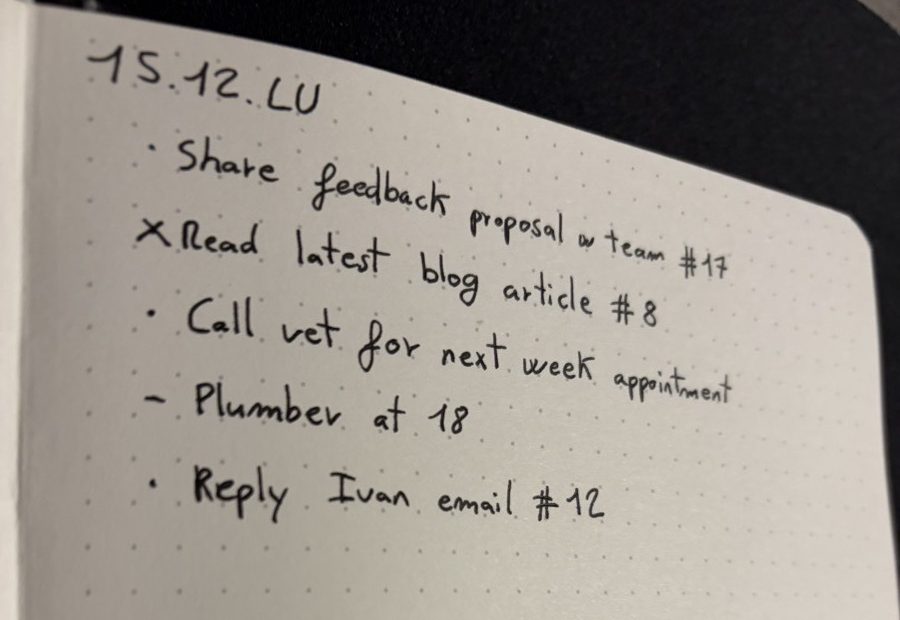
Write a short number next to the bullet, like #17, and save the link, photo or file in Numly under that number. Weeks later, type 17 on your iPhone or Mac and it opens. The page stays paper; the number is the only bridge.
Escribe un número corto junto a la viñeta, como #17, y guarda el enlace, la foto o el archivo en Numly con ese número. Semanas después, tecleas 17 en el iPhone o el Mac y se abre. La página sigue siendo de papel; el número es el único puente.
The three steps
Los tres pasos
- Save it. From Safari, Photos, Files or any app, tap Share and pick Numly. It gets a number.
- Write the number. Put
#17at the end of the bullet: in the daily log, in a collection, or next to an entry in your index. - Type it back. Open Numly and type 17. On iPhone you can also type the number in Spotlight or ask Siri; on Mac, press ⌥Space from anywhere.
- Guárdalo. Desde Safari, Fotos, Archivos o cualquier app, toca Compartir y elige Numly. Recibe un número.
- Escribe el número. Pon
#17al final de la viñeta: en el registro diario, en una colección o junto a una entrada del índice. - Tecléalo. Abre Numly y escribe 17. En el iPhone también puedes buscar el número en Spotlight o pedírselo a Siri; en el Mac, pulsa ⌥Espacio desde cualquier sitio.
Where the number goes in a bullet journal
Dónde va el número en un bullet journal
| Spread | What the number points to |
|---|---|
| Daily log | The article to read, the email to answer, the doc to review. The bullet stays short; the detail is one number away. |
| Collections | Books to read, recipes, gift ideas: each line keeps its link without copying URLs by hand. |
| Index | Next to "Trip planning, pp. 34-36", the number of the folder of bookings and maps. |
| Meeting notes | The slides or the recording of that meeting. |
| Página | A qué apunta el número |
|---|---|
| Registro diario | El artículo que leer, el correo que contestar, el documento que revisar. La viñeta sigue siendo corta; el detalle está a un número. |
| Colecciones | Libros pendientes, recetas, ideas de regalo: cada línea conserva su enlace sin copiar URLs a mano. |
| Índice | Junto a «Viaje, págs. 34-36», el número de la carpeta con reservas y mapas. |
| Notas de reuniones | Las diapositivas o la grabación de esa reunión. |
Why a number and not a QR code
Por qué un número y no un código QR
A QR code has to be printed and glued in. A two- or three-digit number you write with the same pen, in the same line, in a second. You can read it at a glance, search for it, and say it out loud to Siri.
Un código QR hay que imprimirlo y pegarlo. Un número de dos o tres cifras lo escribes con el mismo boli, en la misma línea, en un segundo. Se lee de un vistazo, se busca y se le puede decir a Siri.
Questions
Preguntas
Do the numbers clash between iPhone and Mac? No. The last digit of every number identifies the device that created it, so two devices syncing through iCloud never hand out the same one.
¿Se repiten los números entre el iPhone y el Mac? No. La última cifra de cada número identifica el dispositivo que lo creó, así que dos dispositivos que se sincronizan por iCloud nunca reparten el mismo.
Do saved items expire? No. An item stays until you delete it. A deleted item's number becomes free again, so cross out that reference in your notebook.
¿Caducan los elementos guardados? No. Un elemento sigue ahí hasta que lo borras. El número de un elemento borrado queda libre otra vez, así que tacha esa referencia en tu libreta.
What does it cost? Free for up to 5 items. Unlimited is a one-time purchase ($4.99 in the US), no subscription.
¿Cuánto cuesta? Gratis hasta 5 elementos. Ilimitado es un pago único (4,99 $ en EE. UU.), sin suscripción.
Can I get my data out? Yes, Settings exports everything to a CSV file.
¿Puedo sacar mis datos? Sí, desde Ajustes se exporta todo a un archivo CSV.
New to the method? The official Bullet Journal guide explains the daily log, collections and index.
¿Empiezas con el método? La guía oficial del Bullet Journal explica el registro diario, las colecciones y el índice.